Menu
Cart is empty

AC Universal Remote Control - Universal Air Conditioning Remote Control CHUNGHOP K-1028E

Special Price LKR 1500.00

Regular Price:

Availability: IN STOCK

Size : 0.00cm x 0.00cm x 0.00cm
Weight : 0.00g


  • Islandwide Delivery Available


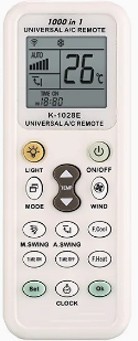
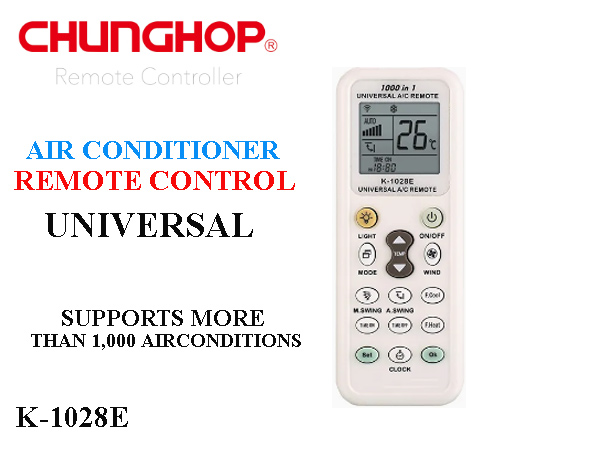
The Chunghop K-1028E is a 1000-in-1 universal air conditioner remote control designed as a direct replacement for lost or damaged AC remotes. It supports over 1,000 models from major brands, including Gree, Midea, LG, Daikin, Panasonic, Toshiba, Haier, Carrier, York, Samsung, and Hitachi.


  • Large LCD Display: Clear screen showing temperature, fan speed, airflow direction, clock, operating mode (Cool, Heat, Dry, Fan, Auto), and programmed brand code.

  • Built-in LED Torch Light: Includes a dedicated light button to illuminate the display or use as a flashlight in the dark.

  • Fast Cooling & Fast Heating Buttons: One-touch shortcut keys ("F. Cool" and "F. Heat") quickly switch the AC to standard cooling (21°C) or heating (27°C) modes.

  • Timer & Clock Function: Built-in digital clock with configurable ON/OFF timer functions for scheduled operation.

  • Power-Off Memory: Retains programmed codes even when changing batteries.


Feature Details
Model Chunghop K-1028E
Compatibility Wall-mounted, split, inverter, and window AC units (1,000+ codes)
Material Durable ABS plastic body with silicone buttons
Operating Range Approximately 8 meters (~26 feet)
Power Source 2 × AAA batteries (1.5V)


Quick Programming Methods

1. Direct Code Entry: Manual Pairing.

Turn on the AC unit manually. Hold the SET button for 3 seconds until the code flickers on the LCD display. Use the Temp ▲/▼ buttons to navigate to your brand's specific code (found in the included manual). Press OK when the AC beeps.


2. Auto Digital Search: Automatic Pairing.

Point the remote at the AC unit. Press and hold the SET button for 6 seconds. The remote will cycle through codes automatically. The moment the AC beeps and turns on, press OK immediately to lock the code.


3. Brand Point-to-Point Search: Fast Search.

For major brands, point the remote at the AC and press/hold the specific brand key corresponding to your AC until the unit turns on, then press OK.


To reset or clear the stored code memory on a Chunghop K-1028E universal AC remote, use one of the following methods:


Method 1: Hardware Hard Reset (Recommended)

  1. Open the battery compartment cover on the back of the remote.

  2. Remove both AAA batteries.

  3. Press and hold down any button (e.g., the POWER button) for 10 to 15 seconds. This fully discharges the internal capacitors holding residual memory.

  4. Leave the batteries out for 2 to 3 minutes.

  5. Reinsert fresh AAA batteries. The LCD display will reset to default factory settings, clearing out the previously saved AC brand code.


Method 2: Manual Code Zeroing

If you want to clear the configured brand code manually through the keypad:

  1. Press and hold the SET button for approximately 3 seconds until the three-digit code display in the bottom right corner starts flashing.

  2. Use the Temp ▲ / Temp ▼ buttons to scroll the numerical code back to 000 (or 0000 depending on the production revision).

  3. Press the OK button to confirm and save. This unlinks any assigned brand profiles.

Verification

Once reset, pressing the Power or Mode buttons toward your air conditioner should yield no response from the unit until a new valid brand code is configured via the SET process.


Chunghop K-1028E code numbers for popular AC brands:


The Chunghop K-1028E uses a 3-digit code system ranging from 000 to 999 to pair with air conditioning units. Most major brands have multiple code ranges to account for different model series and manufacturing years.


Popular Brand Codes

Brand Code Ranges
Gree 000, 020–039
Haier 001–019
Midea 040–058
Changhong 059–079, 934, 947
Chigo 080–099
Huabao 100–109
Kelong 110–119
TCL 120–133
Galanz 124–129, 134–139, 936–940
Hualing 150–169, 045
Chunlan 170–179
AUX 180–199
Shinco 200–209
Aucma 210–229, 933
Hisense 230–239
Electrolux 250, 471–474, 807–808, 906
Frestech 270–279, 944–945
Mitsubishi 551–599
LG 600–609
Samsung 610–629
Toshiba 630–639
Hitachi 640–659
Panasonic / National 660–689
Carrier 399, 690–699, 890–899
Fujitsu / OGeneral 659, 700–719
Sharp 720–739
Daikin 740–759
Corona 760–769
Whirlpool 119, 550, 739, 770, 774
York 775–779
Hyundai 780–789
McQuay 790–795
Trane 812–816
Teco 831–834
Sanyo / NEC 500–550, 860, 943, 946
Voltas 056, 057, 549, 598, 609, 627–629

How to Apply a Code

  1. Hold SET for ~3 seconds until the code number flickers on the LCD display.

     
  2. Use Temp ▲ / Temp ▼ to navigate through the range listed for your brand.

  3. When the AC beeps or switches on, press OK to lock in the code.


Tip: If the first code in a range turns the AC on but some features (like fan speed or swing) don't work, try the remaining numbers in that brand's code range until all functions respond correctly.


Customer Reviews

Write Your Own Review

How do you rate this product?*

1 star 2 stars 3 stars 4 stars 5 stars
Your Rate